Stop users from creating agent identity blueprints
On 13 October 2026 Microsoft published message center post MC1506733: from 4 November 2026, users without any Entra role can create agent identity blueprints, and agent identities from those blueprints, unless an admin turns that off. The rollout runs from early to late November, and a setting you change now is honoured when the rollout reaches your tenant. In this post I turn the setting off, inventory the agent identity blueprints that already exist, lock down who can still create them, and set up Conditional Access for agents in report-only mode.
Info
This post is written before the November 2026 rollout. I will update it once the change has landed in my tenants. Microsoft Entra Agent ID screens and some Graph endpoints in this post are in preview; checked October 2026.
Table Of Contents
What an agent identity blueprint is
An agent identity blueprint is an object in Entra ID that acts as the template for agent identities. It holds the settings every agent of that type shares (description, app roles, verified publisher, token settings) and it holds the credentials that its agent identities use to get tokens. In Graph it is an application subtype, so it shows up in the audit logs as an application.
Several related objects come with it. You need to know all of them before you start blocking or deleting things.
| Object | What it is | Why it matters for this change |
|---|---|---|
| Agent identity blueprint | Template and credential container for agent identities. Graph type agentIdentityBlueprint, inherits from application. | OAuth permissions granted to the blueprint apply to every agent identity created from it. |
| Blueprint principal | The service principal that represents the blueprint in your tenant. Tokens and audit events point to this object. | Deleting the blueprint principal removes the blueprint from your tenant. ISV blueprints arrive in your tenant as a blueprint principal. |
| Agent identity | The identity an agent runs as. Graph type agentIdentity, a service principal subtype. | Authenticates with the credentials on its blueprint. Disabling the blueprint stops all of its agent identities. |
| Agent’s user account | Optional user object linked 1:1 to an agent identity, for agents that need a mailbox or other user-only resources. | Gets tokens as a user (idtyp=user), has no password and can’t hold privileged admin roles. |
| Owner | Technical administrator of a blueprint or agent identity. Users or service principals, no groups. Optional. | Owners can create agent identities from their blueprint without an Agent ID role, and can re-enable or restore what was disabled or deleted. |
| Sponsor | Business owner who is accountable for the agent. Users, dynamic groups or Microsoft 365 groups. Required for blueprints and agent identities. | Sponsors can disable or soft-delete an agent identity, but can’t change its configuration or re-enable it. |
The split between owner and sponsor is described on the administrative relationships page. Keep it in mind: once the default changes, every user who creates a blueprint becomes its owner.
Why the new default is a risk
The pattern is the same as with Users can register applications, which many tenants switched off years ago. Per Create an agent identity blueprint, a user who creates a blueprint is set as owner of both the blueprint and its blueprint principal. As owner they can create agent identities from it without any Agent ID role. According to Learn’s default user permissions page, members can also manage properties, assignments and credentials of the blueprints and agent identities they own.
That means a regular account can put a new non-human identity in your directory, configure it and start asking for consent. Any permission an admin later grants to that blueprint flows to every agent identity created from it. If the account that owns the blueprint is compromised, the attacker gets a ready-made factory for new agent identities.
Turning the default off before the rollout is a five-minute change. Cleaning up after a month of open creation takes a lot longer.
What the setting doesn’t change
According to MC1506733 the toggle only controls whether default users can create new blueprints. It doesn’t affect:
- blueprints that already exist in your tenant
- who can create agent identities from existing blueprints (owners keep that right)
- apps and agents that create agent identities through Graph permissions
- the creation requirements in Azure AI Foundry and Security Copilot
- the Users can register applications setting, which is separate. Review both.
So the toggle is the first step. The sections after the steps cover the paths it leaves open.
Prerequisites
- To change the setting: at least Cloud Application Administrator.
- To read blueprints, owners and sponsors through Graph when you aren’t the owner: Agent ID Administrator, per the Graph List agentIdentityBlueprint page. The same role is needed to disable blueprints and agent identities.
- To read audit logs: at least Reports Reader.
- To create Conditional Access policies for agents: Conditional Access Administrator plus the licences in the Conditional Access section.
- PowerShell 7 with the Microsoft Graph PowerShell SDK (
Microsoft.Graph.Authentication,Microsoft.Graph.Applications,Microsoft.Graph.Identity.Governance,Microsoft.Graph.Identity.SignIns). - Graph scopes are listed above each script.
Turn off user creation of agent identity blueprints
In the Microsoft Entra admin center
The steps are on Learn under Restrict who can create applications and agents.
- Sign in to the Microsoft Entra admin center as at least a Cloud Application Administrator.
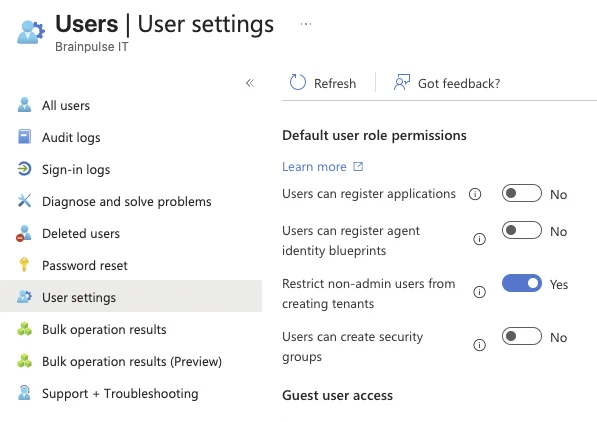
- Browse to Entra ID > Users > User settings.
- Under Default user role permissions, set Users can register agent identity blueprints to No. Microsoft Learn and MC1506733 call this setting “Users can create agent blueprints”; in the admin center, as of October 2026, the label is “Users can register agent identity blueprints”.
- Select Save.
With the setting on No, only administrators and users with the Agent ID Developer role can create new agent identity blueprints.
If the setting isn’t visible yet, a hard refresh of the browser can help. The change rolls out per tenant during November.
With Microsoft Graph PowerShell
Warning
As of October 2026 the property for this setting is in beta and not yet documented on Learn. The defaultUserRolePermissions beta reference only lists the older settings, such as allowedToCreateApps. Read the policy first and only patch once you see the property in your own tenant.
The property name reported by the community is allowedToCreateAgentIdentityBlueprints on defaultUserRolePermissions of the beta authorizationPolicy.
I use Invoke-MgGraphRequest here instead of Update-MgBetaPolicyAuthorizationPolicy. The beta cmdlet needs the separate beta module and an -AuthorizationPolicyId, and with a request you see exactly what goes over the wire.
# Read:  Policy.Read.All
# Write: Policy.ReadWrite.Authorization
# Role:  at least Cloud Application Administrator
Connect-MgGraph -Scopes 'Policy.Read.All', 'Policy.ReadWrite.Authorization'

$uri = 'https://graph.microsoft.com/beta/policies/authorizationPolicy'

# 1. Look at the current default user role permissions first
$policy = Invoke-MgGraphRequest -Method GET -Uri $uri -OutputType PSObject
$policy.defaultUserRolePermissions | Format-List

# 2. Only continue when the property is present in the output above
$body = @{
    defaultUserRolePermissions = @{
        allowedToCreateAgentIdentityBlueprints = $false
    }
} | ConvertTo-Json -Depth 3

Invoke-MgGraphRequest -Method PATCH -Uri $uri -Body $body -ContentType 'application/json'

# 3. Confirm the change
(Invoke-MgGraphRequest -Method GET -Uri $uri -OutputType PSObject).defaultUserRolePermissions |
    Select-Object allowedToCreateApps, allowedToCreateAgentIdentityBlueprints
The PATCH only sends the one property, so the other default user role permissions stay as they are. The last command shows the setting next to allowedToCreateApps (the Users can register applications setting), so you check both in one go.
Who can still create blueprints
After the change, these principals can still create agent identity blueprints, based on How are agent identities created?:
| Who | How | What they also get |
|---|---|---|
| Users with Agent ID Developer | Admin center, Graph, PowerShell, IaC | Become owner of the blueprint and blueprint principal |
| Users with Agent ID Administrator | Same channels | Manage all agent objects in the tenant, including secrets and certificates on blueprints |
Apps with the AgentIdentityBlueprint.Create application permission | Graph, app-only | No user involved, so no role check |
Apps with AgentIdentityBlueprint.Create delegated | Graph, on behalf of a user | Only works when the signed-in user has one of the Agent ID roles |
| Owners of existing blueprints | Graph, delegated | Can’t create new blueprints, but can create new agent identities from the ones they own |
A standard user who tries to create a blueprint after the change gets an error.
Find existing blueprints and agent identities
The toggle doesn’t touch what is already there, so take a baseline now and run it again after the rollout.
In the admin center
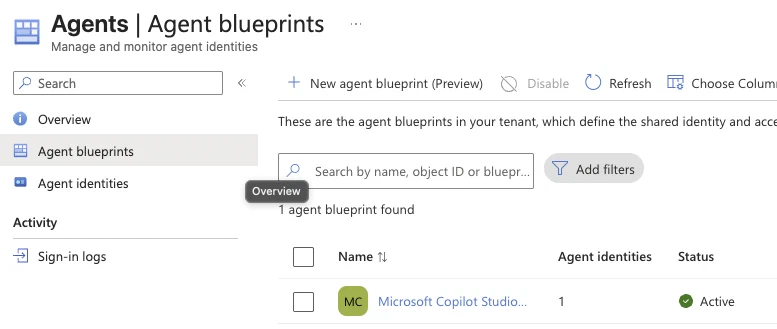
- Browse to Entra ID > Agents > Agent blueprints.
- Use Choose columns to show Agent identities, Status and Blueprint Application ID.
- Open a blueprint and check Linked agent identities, Granted permissions (both the Admin consent and User consent tabs) and Owners and sponsors. Owners and sponsors has two tabs, Agent blueprint and Agent blueprint principal; check both. As of October 2026 these pages are labelled preview.
- Browse to Entra ID > Agents > Agent identities for the full list of agent identities.
The blueprint page also has its own Audit logs and Sign-in logs. All of this is on View and manage agent identity blueprints.
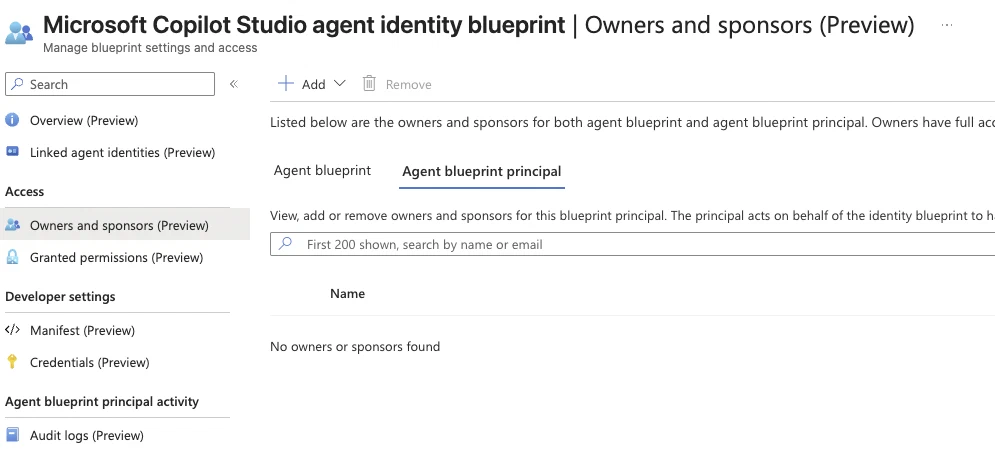
That is the gap to look for: a blueprint that nobody owns and nobody sponsors still holds permissions, and nobody is asked about it in an access review.
With PowerShell
The function below reads all blueprints and agent identities through Graph v1.0 and returns one row per blueprint with owners, sponsors and the number of agent identities. An agent identity points to its blueprint through agentIdentityBlueprintId, which holds the blueprint’s appId.
# Scopes: AgentIdentityBlueprint.Read.All, AgentIdentity.Read.All, Application.Read.All
# Role:   Agent ID Administrator (needed when you aren't the owner of the blueprints)
Connect-MgGraph -Scopes 'AgentIdentityBlueprint.Read.All', 'AgentIdentity.Read.All', 'Application.Read.All'

function Get-AgentBlueprintInventory {
    <#
    .SYNOPSIS
        Lists agent identity blueprints with owners, sponsors and agent identity count.

    .DESCRIPTION
        Reads all agent identity blueprints and agent identities from Microsoft Graph v1.0
        and returns one object per blueprint. Run it before and after the November 2026
        default change and compare the output.

    .PARAMETER CreatedAfter
        Only return blueprints created after this date.

    .EXAMPLE
        Get-AgentBlueprintInventory | Format-Table DisplayName, CreatedDateTime, Owners, Sponsors, AgentIdentityCount

    .EXAMPLE
        Get-AgentBlueprintInventory -CreatedAfter '2026-11-01' | Export-Csv -Path .\agent-blueprints.csv -NoTypeInformation

    .NOTES
        Requires Microsoft.Graph.Authentication and an existing Connect-MgGraph session.
    #>
    [CmdletBinding()]
    param(
        [datetime]$CreatedAfter
    )

    $graph = 'https://graph.microsoft.com/v1.0'

    function Get-GraphCollection {
        param([string]$Uri)
        $items = [System.Collections.Generic.List[object]]::new()
        while ($Uri) {
            $response = Invoke-MgGraphRequest -Method GET -Uri $Uri -OutputType PSObject
            foreach ($item in $response.value) { $items.Add($item) }
            $Uri = $response.'@odata.nextLink'
        }
        $items
    }

    $label = {
        param($Object)
        if ($Object.userPrincipalName) { $Object.userPrincipalName }
        elseif ($Object.displayName) { $Object.displayName }
        else { $Object.id }
    }

    $agentIdentities = Get-GraphCollection -Uri "$graph/servicePrincipals/microsoft.graph.agentIdentity?`$select=id,displayName,agentIdentityBlueprintId"
    $identitiesByBlueprint = $agentIdentities | Group-Object -Property agentIdentityBlueprintId -AsHashTable -AsString
    if (-not $identitiesByBlueprint) { $identitiesByBlueprint = @{} }

    $blueprints = Get-GraphCollection -Uri "$graph/applications/microsoft.graph.agentIdentityBlueprint?`$select=id,appId,displayName,createdDateTime,signInAudience"
    if ($CreatedAfter) {
        $blueprints = $blueprints | Where-Object { [datetime]$_.createdDateTime -gt $CreatedAfter }
    }

    foreach ($blueprint in $blueprints) {
        $owners   = Get-GraphCollection -Uri "$graph/applications/$($blueprint.id)/microsoft.graph.agentIdentityBlueprint/owners"
        $sponsors = Get-GraphCollection -Uri "$graph/applications/$($blueprint.id)/microsoft.graph.agentIdentityBlueprint/sponsors"

        $identityCount = 0
        if ($identitiesByBlueprint.ContainsKey([string]$blueprint.appId)) {
            $identityCount = @($identitiesByBlueprint[[string]$blueprint.appId]).Count
        }

        [pscustomobject]@{
            DisplayName        = $blueprint.displayName
            AppId              = $blueprint.appId
            CreatedDateTime    = $blueprint.createdDateTime
            SignInAudience     = $blueprint.signInAudience
            Owners             = ($owners | ForEach-Object { & $label $_ }) -join '; '
            Sponsors           = ($sponsors | ForEach-Object { & $label $_ }) -join '; '
            AgentIdentityCount = $identityCount
        }
    }
}

Get-AgentBlueprintInventory | Sort-Object CreatedDateTime | Format-Table -AutoSize
What to look for in the output: blueprints with an empty Owners column (nobody to contact when something goes wrong), sponsors that are a single person instead of a group, and blueprints with a signInAudience of AzureADMultipleOrgs that you didn’t expect.
The function lists blueprints registered in your own tenant. Blueprints from an ISV live in the ISV’s tenant and only show up in yours as a blueprint principal, so check the admin center list as well.
Audit log query
Creating a blueprint is logged as Add application and creating an agent identity as Add service principal. Per Microsoft Entra Agent ID logs, the agentType property on targetResources tells you whether the object is agentic: agenticApp for a blueprint, agenticAppInstance for an agent identity. The property is on the beta endpoint, so the query uses /beta.
# Scope: AuditLog.Read.All
# Role:  at least Reports Reader
Connect-MgGraph -Scopes 'AuditLog.Read.All'

$since  = (Get-Date).AddDays(-30).ToUniversalTime().ToString('yyyy-MM-ddTHH:mm:ssZ')
$filter = "activityDateTime ge $since and (activityDisplayName eq 'Add application' or activityDisplayName eq 'Add service principal')"
$uri    = "https://graph.microsoft.com/beta/auditLogs/directoryAudits?`$filter=$([uri]::EscapeDataString($filter))"

$events = [System.Collections.Generic.List[object]]::new()
while ($uri) {
    $page = Invoke-MgGraphRequest -Method GET -Uri $uri -OutputType PSObject
    foreach ($item in $page.value) { $events.Add($item) }
    $uri = $page.'@odata.nextLink'
}

$events |
    Where-Object { $_.targetResources | Where-Object agentType -in 'agenticApp', 'agenticAppInstance' } |
    Select-Object activityDateTime, activityDisplayName,
        @{ Name = 'Target';      Expression = { $_.targetResources[0].displayName } },
        @{ Name = 'AgentType';   Expression = { $_.targetResources[0].agentType } },
        @{ Name = 'InitiatedBy'; Expression = {
            if ($_.initiatedBy.user) { $_.initiatedBy.user.userPrincipalName } else { $_.initiatedBy.app.displayName }
        } } |
    Format-Table -AutoSize
If an app created the object, the InitiatedBy column shows the app name. That’s your lead for the service principal review further down.
Lock down who can still create
Agent ID roles, including PIM-eligible assignments
Learn’s disable agent identities page says to remove both active and eligible assignments of Agent ID Administrator and Agent ID Developer if you want to block creation completely. I also include AI Administrator, because that role can create agent identities.
# Scopes: RoleManagement.Read.Directory, RoleEligibilitySchedule.Read.Directory
Connect-MgGraph -Scopes 'RoleManagement.Read.Directory', 'RoleEligibilitySchedule.Read.Directory'

# Built-in role template IDs from the Microsoft Entra built-in roles reference
$agentRoles = @{
    'Agent ID Administrator' = 'db506228-d27e-4b7d-95e5-295956d6615f'
    'Agent ID Developer'     = 'adb2368d-a9be-41b5-8667-d96778e081b0'
    'AI Administrator'       = 'd2562ede-74db-457e-a7b6-544e236ebb61'
}

$result = foreach ($role in $agentRoles.GetEnumerator()) {
    $filter = "roleDefinitionId eq '$($role.Value)'"

    Get-MgRoleManagementDirectoryRoleAssignment -Filter $filter -ExpandProperty Principal -All |
        ForEach-Object {
            [pscustomobject]@{
                Role      = $role.Key
                State     = 'Active'
                Principal = $_.Principal.AdditionalProperties.displayName
                Scope     = $_.DirectoryScopeId
            }
        }

    Get-MgRoleManagementDirectoryRoleEligibilitySchedule -Filter $filter -ExpandProperty Principal -All |
        ForEach-Object {
            [pscustomobject]@{
                Role      = $role.Key
                State     = 'Eligible'
                Principal = $_.Principal.AdditionalProperties.displayName
                Scope     = $_.DirectoryScopeId
            }
        }
}

$result | Sort-Object Role, State | Format-Table -AutoSize
The role IDs come from Microsoft Entra built-in roles. Active assignments include PIM activations that are running at that moment, so run it more than once if PIM is in use.
A model that fits Learn’s guidance: no permanent assignments. Developers who build agents get Agent ID Developer as a PIM-eligible role with a justification and a short activation window. Agent ID Administrator is marked as a privileged role on Learn, so it gets approval on activation and stays with the identity team. The same approach applies to Intune admin roles (post: Intune admin is the new domain admin).
Service principals with creation permissions
Apps can create blueprints, agent identities and agent users through Graph without any user. The permissions to look for are listed on the same Learn page:
# Scopes: Application.Read.All, Directory.Read.All
Connect-MgGraph -Scopes 'Application.Read.All', 'Directory.Read.All'

$creationPermissions = @(
    'AgentIdentity.Create.All'
    'AgentIdentityBlueprint.Create'
    'AgentIdentityBlueprint.ReadWrite.All'
    'AgentIdentityBlueprintPrincipal.Create'
    'AgentIdentityBlueprintPrincipal.ReadWrite.All'
    'AgentIdUser.ReadWrite.IdentityParentedBy'
    'AgentIdUser.ReadWrite.All'
    'User.ReadWrite.All'
)

$graphSp  = Get-MgServicePrincipal -Filter "appId eq '00000003-0000-0000-c000-000000000000'"
$appRoles = $graphSp.AppRoles | Where-Object Value -in $creationPermissions

# Application permissions (app-only, no user involved)
Get-MgServicePrincipalAppRoleAssignedTo -ServicePrincipalId $graphSp.Id -All |
    Where-Object AppRoleId -in $appRoles.Id |
    Select-Object PrincipalDisplayName, PrincipalId,
        @{ Name = 'Permission'; Expression = { $id = $_.AppRoleId; ($appRoles | Where-Object Id -eq $id).Value } },
        @{ Name = 'Type'; Expression = { 'Application' } } |
    Format-Table -AutoSize

# Delegated permissions (only effective together with the signed-in user's role or ownership)
Get-MgOauth2PermissionGrant -Filter "resourceId eq '$($graphSp.Id)'" -All |
    ForEach-Object {
        $granted = $_.Scope -split ' ' | Where-Object { $_ -in $creationPermissions }
        if ($granted) {
            [pscustomobject]@{
                Client      = (Get-MgServicePrincipal -ServicePrincipalId $_.ClientId).DisplayName
                ConsentType = $_.ConsentType
                Permission  = $granted -join ', '
                Type        = 'Delegated'
            }
        }
    } |
    Format-Table -AutoSize
Be careful with User.ReadWrite.All. It is on the list because it allows creating agent users, but plenty of HR provisioning and lifecycle tools use it to manage normal user accounts. Removing it breaks those tools. Review it, don’t remove it blindly.
Sponsors and owners
Every blueprint and agent identity needs a sponsor. Use a dynamic membership group or a Microsoft 365 group for that, because assigned security groups and role-assignable groups aren’t supported as sponsors. A group keeps working when someone changes jobs. Owners are optional and can only be users or service principals, so check in the inventory output that every blueprint has at least one owner who still works for you.
Close the other doors
Most of these channels aren’t covered by Users can register agent identity blueprints. The controls come from the disable agent identities and creation channels pages linked earlier.
| Channel | Covered by the toggle | Control |
|---|---|---|
| Users in the admin center, Graph, PowerShell or IaC | Yes, for users without a role | The toggle plus Agent ID role assignments |
| Apps with Graph permissions | No | Remove the app role assignments and delegated grants from the previous section |
| Owners of existing blueprints | No | Review owners, disable or delete blueprints you don’t need |
| ISV agents through user consent | No | User consent settings. There is no agent-only switch, so blocking user consent also blocks consent for normal SaaS apps. |
| Copilot Studio | No | Block self-service trials, don’t assign licences, restrict who can create Power Platform environments. Data policies stop publishing, not creation. |
| Azure AI Foundry | No | Restrict who can create Azure subscriptions; only assign Azure AI Account Owner and Azure AI User where needed |
| Security Copilot | No | Limit who can enable Microsoft agents and who is Owner or Contributor of a Security Copilot workspace |
| Microsoft Teams | No | Teams app policies for Microsoft, third-party and custom apps |
Start with the user consent row. If your tenant still allows users to consent to any app, an employee can add an ISV agent to your tenant with one click. If blocking consent has too much impact, rely on the Conditional Access block policies below for ISV agents you didn’t approve.
Conditional Access for agents (report-only first)
Conditional Access for agents blocks tokens, not creation. A policy stops an agent identity from getting a token, but the blueprint and agent identity are still created. Use it next to the toggle, not instead of it.
Licensing, as of October 2026: Microsoft 365 E7, or a Microsoft Agent 365 licence together with Entra ID P1 or Microsoft 365 E3. Risk-based policies for agents also need Entra ID P2 or Microsoft 365 E5 (secure autonomous agents). The disable agent identities page only mentions Entra ID P1, so the two Learn pages don’t agree.
My lab tenant doesn’t have Agent 365 or E7, so I haven’t tested the agent policies below myself. The steps follow Microsoft Learn.
How policies target agents:
- Under Assignments > Users, agents (Preview) or workload identities, select Agents. Per target agent identities, you can choose All agent identities, All agent users (Preview), Select agent identities or Select agent users (Preview).
- Targeting a blueprint covers all its agent identities, including ones created later. It doesn’t cover agent users.
- Policies for All users don’t apply to agent users. Your existing baseline policies don’t protect them.
- When an agent acts on behalf of a signed-in user, the user’s policies apply, not the agent policies.
- For agent identities the only grant control is Block. There is no MFA for an identity without a human.
Learn has three block policies for agents: block agent identities, block agent users and block users from signing in to agents. Create them in report-only mode, look at the sign-in logs for a week and then decide which agents get an exclusion.
I name them after the Conditional Access baseline of Kenneth van Surksum: [prefix][number]-[scope]: [action] [description]-v[version]. Agent identities are identities, so they go under the CAU prefix, next to the baseline’s own policy for managed identities (CAU014). Report-only is the policy state, not part of the name, so nothing needs renaming when you switch it on.
| Policy | Name |
|---|---|
| Block agent identities | CAU020-All: Block access for All agent identities-v1.0 |
| Block agent users | CAU021-All: Block access for All agent users-v1.0 |
| Block users signing in to agents | CAU022-AgentResources: Block access for All users when Browser and Modern Auth Clients-v1.0 |
Agent identities can’t be members of an exclusion group, so you exclude them by selecting the blueprint or the agent identity in the policy. For CAU022, which targets users, an exclusion group like AAD_UA_CAU022_Exclude works the same as in the baseline.
This creates CAU020 through Graph:
# Scopes: Policy.Read.All, Policy.ReadWrite.ConditionalAccess
# Role:   at least Conditional Access Administrator
Connect-MgGraph -Scopes 'Policy.Read.All', 'Policy.ReadWrite.ConditionalAccess'

$policy = @{
    displayName   = 'CAU020-All: Block access for All agent identities-v1.0'
    state         = 'enabledForReportingButNotEnforced'
    conditions    = @{
        clientApplications = @{
            includeAgentIdServicePrincipals = @('All')
            excludeAgentIdServicePrincipals = @()
        }
        applications       = @{
            includeApplications = @('All')
        }
    }
    grantControls = @{
        operator        = 'AND'
        builtInControls = @('block')
    }
} | ConvertTo-Json -Depth 5

Invoke-MgGraphRequest -Method POST -Uri 'https://graph.microsoft.com/beta/identity/conditionalAccess/policies' -Body $policy -ContentType 'application/json'
For CAU021 and CAU022, change the name and replace the conditions with includeUsers = @('AllAgentIdUsers') (CAU021, block agent users) or includeUsers = @('All') with includeApplications = @('AllAgentIdResources') (CAU022, block users signing in to agents). The disable agent identities page has the JSON for all three.
One Windows 365 detail: agent users that run on a Cloud PC can be required to use a compliant device. Use the Agent execution environments (Preview) condition so the policy only applies to sessions from endpoints. Agents that run in the cloud without a device would otherwise be blocked with no way to fix it.
The Risky agents report in ID Protection is in preview.
Gotchas
- The toggle and app registration are separate. Changing one doesn’t change the other, so check both in the same blade.
- Existing owners keep creating identities. The toggle doesn’t remove ownership, so a user who created a blueprint before the change can keep adding agent identities to it.
- The two lists don’t match. The admin center Agent blueprints list shows blueprint principals, including ISV blueprints. The Graph list of
agentIdentityBlueprintonly shows blueprints registered in your tenant. Use both. - Not every agent is an agent identity. Agents built with earlier versions of Copilot Studio and Azure AI Foundry can be classic app registrations and service principals. They don’t show up under Agents and are governed like any other app.
- Disabled isn’t gone. A disabled blueprint stops all its agent identities from authenticating, but the permission grants stay. Whoever re-enables it gets all permissions back without a new approval, per Learn’s Zero Trust guidance for AI. Sponsors can disable but can’t re-enable. When an agent is retired, delete the blueprint: that also cleans up its agent identities and agent users.
- Every member can read the inventory. Members can list all blueprints, blueprint principals and agent identities by default. That isn’t a creation risk, but keep it in mind for naming and descriptions.
Wrap-up
What to do before 4 November 2026:
- Set Users can register agent identity blueprints to No.
- Check Users can register applications in the same blade.
- Run
Get-AgentBlueprintInventoryand export the output as your baseline. - Review active and PIM-eligible assignments of Agent ID Administrator, Agent ID Developer and AI Administrator.
- Review service principals with the creation permissions from the table.
- Make sure every blueprint has an owner and a group as sponsor.
- Decide on user consent and the product controls for Copilot Studio, Azure AI Foundry, Security Copilot and Teams.
- Create CAU020, CAU021 and CAU022 in report-only mode.
- Run the inventory and audit query again in late November and compare.
If you are also reviewing authentication methods this autumn, read my post on passkeys by default as well.
On Microsoft Learn, start with agent identity blueprints and keep disable agent identities in your tenant at hand for the blocking and clean-up steps.